Table of Contents
- What Cheap Tech Scams Actually Look Like
- Red Flags of Fake Tech Websites
- How to Spot Counterfeit Electronics Before You Buy
- The Psychological Tactics Scammers Use on Tech Buyers
- Safe Online Shopping Practices for Tech
- What to Do If You’ve Fallen for a Cheap Tech Scam
- How to Find Deals on Tech Without the Risk
- Conclusion
Last Updated: August 17, 2026
Cheap tech scams are more sophisticated than ever, and the Federal Trade Commission consistently ranks them among the most commonly reported forms of consumer fraud. At Greenmatrax.com, we review and vet tech products daily. This guide breaks down how to spot fraudulent deals, what scammers do to manipulate buyers psychologically, and exactly what to do if you’ve already been hit.
What Cheap Tech Scams Actually Look Like
Cheap tech scams are fraudulent schemes that use artificially low prices, fake technical warnings, or counterfeit products to steal money or personal information from buyers. They appear across retail websites, social media ads, unsolicited email, and phone calls. The category includes tech support fraud, browser hijacking, phishing emails, and social engineering calls from people claiming to be Microsoft or Apple.
Tech Support Scams and Fraudulent Pop-Ups
Tech support scams typically begin with a pop-up alert claiming your device is infected with malicious software. The alert mimics legitimate security warnings, includes a phone number, and creates intense urgency, sometimes locking your browser.
If you call the number, a scammer posing as technical support requests remote access to your computer. Once granted, they install malware, steal credentials, or charge hundreds of dollars for fake "malware removal" services.
Key facts about these pop-ups:
- Legitimate security software never asks you to call a phone number
- Real system diagnostic tools don’t lock your browser
- No operating system displays a virus scan result in a browser window
- Unsolicited contact from "Microsoft" or "Apple support" is always fraudulent
If you see one of these alerts, close the browser tab or force-quit the application. Do not call the number.
Mobile-Specific Tech Scams to Watch For
Mobile devices are increasingly targeted because users tend to be less cautious on phones. Common mobile scams include fake app stores distributing malware-laden apps, SMS phishing messages claiming delivery holds, and fraudulent ads linking to look-alike checkout pages.
Because mobile screens show less URL detail, browser hijacking and spoofed domains are harder to spot. Always expand the full URL before entering payment information on a mobile device.
Red Flags of Fake Tech Websites
Fake tech websites are designed to look credible at a glance but fall apart under scrutiny.
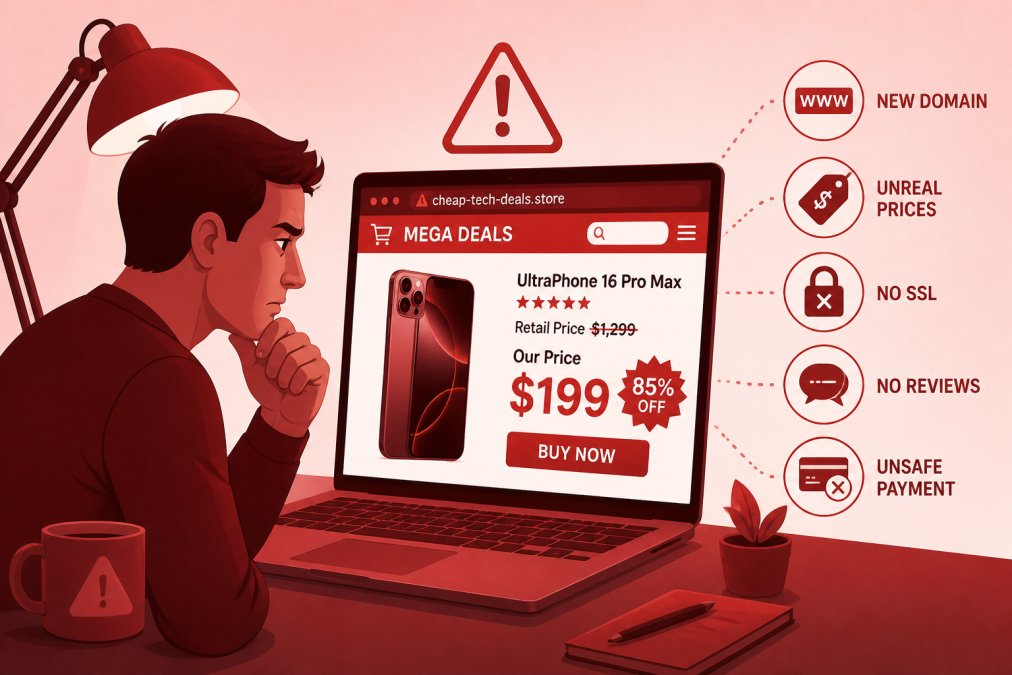
The most reliable red flags of fraudulent online stores include:
- No physical address or phone number. Legitimate retailers provide verifiable contact information.
- Prices that are implausibly low. If a product retails everywhere else at a certain price and this site offers it at a fraction of that, the product is counterfeit, stolen, or nonexistent.
- Recently registered domain. Check domain registration dates using WHOIS lookup tools. Many scam sites are a few weeks old.
- No HTTPS or mismatched SSL certificate. Scammers register domains like "appIe-store.com" (with a capital I instead of lowercase L).
- Stolen product images. Run product images through reverse image search. If the same image appears on dozens of unrelated sites, the listing is fraudulent.
- No return policy or vague terms. Real retailers have clear, specific return and warranty policies.
The FTC guidance on online shopping safety recommends verifying seller reputation through independent review sources before completing any purchase.
How to Spot Counterfeit Electronics Before You Buy
Counterfeit electronics are a genuine safety risk. Fake chargers and batteries have caused fires. Counterfeit medical-grade devices have caused injuries.
Before purchasing:
Look for authorized retailer lists on the manufacturer’s website. Most major electronics brands publish a list of authorized sellers. Check the product listing for vague or inconsistent specifications, counterfeit listings often get technical details wrong, with mismatched model numbers, incorrect supported standards, or wrong dimensions.
When the product arrives:
- Check packaging quality. Legitimate electronics have tight, professional packaging. Counterfeits often have blurry printing, spelling errors, or misaligned logos.
- Verify serial numbers using the manufacturer’s online tools.
- Test immediately. Counterfeit batteries drain faster, displays show color inconsistencies, and audio equipment often has distortion at normal volume levels.
- Check the weight. Counterfeits frequently use cheaper internal components, making them noticeably lighter.
The Consumer Product Safety Commission guidance on counterfeit products provides additional guidance on reporting unsafe counterfeit electronics.
The Psychological Tactics Scammers Use on Tech Buyers
Scammers exploit specific psychological vulnerabilities that make even cautious people act irrationally.
Urgency and scarcity. "Only 2 left at this price" or countdown timers create fear of missing out, shortcircuiting deliberate evaluation. Artificial urgency is not real urgency, legitimate retailers don’t pressure you into buying in the next 10 minutes.
Authority. Scammers impersonate trusted institutions like Microsoft, Apple, or the IRS. People are conditioned to respond to authority figures, which is why tech support scammers specifically claim to represent well-known companies.
Fear. Pop-ups claiming your computer has a virus work because fear of data loss overrides skepticism.
Social proof. Fake review systems and fabricated purchase counts ("10,000+ sold this week") create the impression that others have validated the product.
Reciprocity. Some scams start with a "free" gift or diagnostic scan. Once you’ve accepted something, psychological pressure to reciprocate makes it harder to refuse the upsell.
When you feel urgency, fear, or social pressure during a tech purchase, treat it as a signal to slow down, not speed up.
Safe Online Shopping Practices for Tech
Safe online shopping for tech starts with one principle: verify before you buy, not after.
| Practice | Why It Matters | How to Apply It |
|---|---|---|
| Check seller authorization | Prevents counterfeit purchases | Search brand’s official authorized seller list |
| Verify domain age and HTTPS | Catches fake storefronts | Use WHOIS lookup + check URL carefully |
| Use credit card, not debit | Enables chargeback if scammed | Set up virtual card numbers for extra security |
| Read return policy before buying | Avoids "no refund" traps | Look for specific terms, not vague language |
| Search product + "scam" or "fake" | Surfaces known fraud patterns | Do this before any unfamiliar seller |
| Enable two-factor authentication | Protects accounts post-purchase | Apply to email, payment accounts, and retailer logins |
Protecting Your Payment and Personal Information
Use a credit card rather than a debit card for all online tech purchases. Credit cards offer chargeback rights under the Fair Credit Billing Act, enabling you to dispute unauthorized transactions. Debit card fraud protections are weaker and recovery takes longer.
Many banks now offer virtual card numbers, single-use or merchant-locked numbers that prevent unauthorized transactions even if a site is compromised.
Enable two-factor authentication on every account connected to your purchasing activity: email, payment accounts, and retail platforms. Credential theft through phishing is common, and two-factor authentication stops most account takeover attempts.
Never provide your Social Security number, driver’s license number, or bank account details to an online tech retailer. No legitimate electronics purchase requires this information.
What to Do If You’ve Fallen for a Cheap Tech Scam
The first 24-48 hours after realizing you’ve been scammed are the most important. Move quickly and methodically.
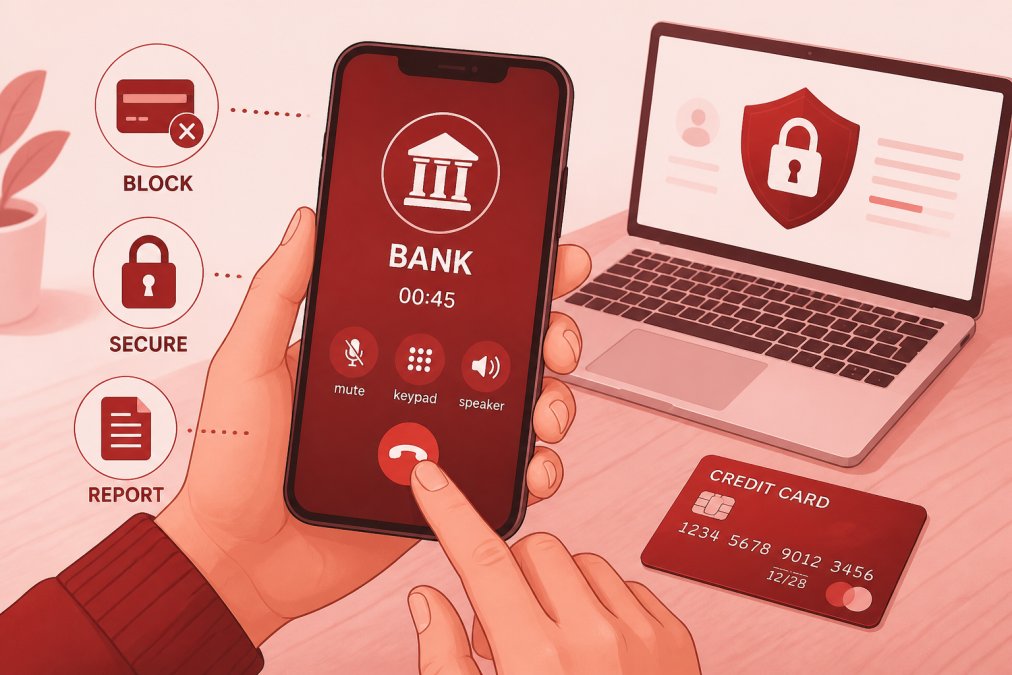
According to FTC consumer advice on what to do if you were scammed, your first call should be to your bank or credit card issuer to report the fraudulent transaction and initiate a dispute.
If a scammer had remote access to your computer, disconnect from the internet immediately, then run a full scan with legitimate security software. Change all passwords from a separate, uncompromised device.
Post-Scam Financial Recovery Checklist
- Call your bank or credit card issuer to report the unauthorized transaction and request a chargeback
- Cancel and replace any compromised credit or debit cards
- Request a credit freeze with all three major credit bureaus (Equifax, Experian, TransUnion) to prevent new accounts being opened in your name
- Change passwords on all accounts from a clean device
- Enable two-factor authentication on all accounts if not already active
- Check your credit report for any accounts you don’t recognize
- Document everything: screenshots, emails, transaction records, and any communication with the scammer
- File a report with the FTC
- If a device was compromised, run security software and consider a factory reset as a last resort
A credit freeze is free under federal law and is the single most effective step you can take to prevent identity theft after a data breach.
Do not attempt to recover funds by re-engaging with the scammer. Some fraud operations run a secondary “recovery scam” where they pose as law enforcement or recovery specialists and charge fees to “retrieve” your money.
How to Report a Tech Scam
Reporting scams helps authorities identify patterns and shut down operations targeting thousands of people.
Where to report:
- FTC: File a report at ReportFraud.ftc.gov
- IC3 (Internet Crime Complaint Center): File at ic3.gov for internet-based fraud
- Your state attorney general’s office: Many states have consumer protection divisions
- The platform where you encountered the scam: Report fraudulent listings to the marketplace, social platform, or app store
Include as much detail as possible: website URL, phone number, email addresses, transaction dates, and any communication received.
Take screenshots of everything before reporting. Scam sites often go offline quickly once they detect scrutiny.
How to Find Deals on Tech Without the Risk
The real question isn’t how to avoid all cheap tech, it’s how to find genuinely good deals without walking into a scam.
Authorized retailer programs from major manufacturers are the safest starting point. Price comparison across multiple legitimate retailers gives you a realistic baseline, if a price is dramatically below that baseline, the product is suspect.
Curated platforms that pre-vet products before listing them solve a different problem: they remove the research burden without removing the protection. Greenmatrax.com operates exactly this way, products are reviewed and selected for genuine quality and value before appearing on the platform. For budget-conscious shoppers who’ve been burned by cheap tech before, that layer of editorial review is the practical difference between a good deal and a scam.
Additional practices that separate safe deal-finding from risky bargain-hunting:
- Set a price alert on a product you want and track it over time. Real discounts follow patterns.
- Read reviews on independent platforms, not just the seller’s own site.
- Check the return window before buying. A 30-day return window is standard.
The safest tech deals come from sellers who have a verifiable track record, clear return policies, and prices that are competitive without being implausible. If a deal requires you to act immediately, that urgency is manufactured, and that’s your signal to walk away.
Cheap tech scams work because they combine real financial pressure with deliberate psychological manipulation. The practical defense is a combination of verification habits, secure payment practices, and knowing exactly what to do when something goes wrong. Greenmatrax.com curates tech deals from vetted sources so you can access competitive prices without the research burden or the fraud risk. Browse the platform for quality-reviewed gadgets and daily deals that have already passed editorial scrutiny.
Frequently Asked Questions
How can I tell if a tech deal is too good to be true?
A price that sits 40-60% below what every other seller charges is the clearest warning sign. Cross-check the model number on the manufacturer's official site and at least two other major retailers. If the seller can't be found through the Better Business Bureau or has no verifiable return address, treat the deal as fraudulent. Scammers count on urgency overriding your judgment, so slow down before entering any payment information.
What are the most common signs of a fraudulent electronics website?
Watch for missing or vague contact details, no physical address, URLs that misspell well-known brand names, and checkout pages that lack HTTPS encryption. Fake tech websites often use stock photos lifted from legitimate retailers, post only five-star reviews with no detail, and offer only wire transfers or gift cards as payment. A site launched within the past year with no independent press coverage is another strong indicator of a scam operation.
What should I do if I suspect I've purchased a counterfeit electronic device?
Stop using the device immediately, especially if it involves charging, counterfeit batteries can be a fire hazard. File a dispute with your credit card issuer under the Fair Credit Billing Act, which gives you the right to challenge unauthorized or misrepresented charges. Report the seller to the FTC at ReportFraud.ftc.gov and to the U.S. Customs and Border Protection if the item was shipped internationally. Keep all packaging and correspondence as evidence.
How do I verify if an online tech retailer is legitimate?
Check the domain age using a WHOIS lookup tool, most scam sites are less than a year old. Search the business name with 'reviews' and 'scam' to surface complaints. Confirm the site has a working customer service phone number or live chat, a clear return policy, and an address you can verify on Google Maps. Legitimate retailers also accept major credit cards, which offer fraud protection under the Fair Credit Billing Act, rather than pushing gift cards or wire transfers.
This article was written using GrandRanker