Table of Contents
- How Long Do Wireless Headphones Last?
- Bluetooth Headphone Battery Drain Causes
- Best Practices for Lithium-Ion Battery Maintenance
- Settings That Improve Wireless Headphone Battery Life
- How to Improve Wireless Headphone Battery Life: Charging Habits
- Troubleshooting Sudden Battery Drops
- Conclusion
- Frequently Asked Questions
Last Updated: September 14, 2026
How Long Do Wireless Headphones Last?
Most wireless headphones last two to three years of regular use before battery capacity drops enough to notice, and the lithium-ion cells inside them are rated in charge cycles rather than calendar time (Alternative Fuels Data Center: Batteries for Electric Vehicles). How long your pair lasts comes down to how you charge, store, and configure them, not to luck.
That distinction matters more than most buyers realize. The battery in your earbuds does not simply “run out” one day. It fades, slowly, through a predictable set of chemical and behavioral causes. Many shoppers replace otherwise perfectly good headphones for no reason beyond a habit they could have changed in thirty seconds.
This guide covers how to improve wireless headphone battery life with settings you can change today, charging habits that protect the cells, and fixes for the sudden drops that send people shopping for replacements. Below, we’ll walk through the causes first, then the fixes, because the fix only works if you understand what’s draining the battery.
Bluetooth Headphone Battery Drain Causes
Bluetooth headphone battery drain causes fall into two buckets: the features you leave switched on and the wireless conditions your headphones operate in. The biggest single drain is active noise cancellation, followed by signal strength and audio processing.
Active Noise Cancellation and Transparency Mode
ANC is the heaviest power draw on any wireless headphone. The microphones, the digital signal processor, and the anti-noise generation all run continuously while the feature is active. Transparency mode is cheaper to run but still keeps microphones and processing live.
A common mistake is leaving ANC on in a quiet room. If you’re at a desk in a silent office, you’re paying full power cost for zero benefit. Switch to a passive or off mode and you recover listening time immediately.
Signal Strength, Codecs, and Audio Enhancements
Weak Bluetooth connectivity forces the radio to work harder, which raises power consumption. The fix is distance and line of sight: keep your phone in a front pocket or on the same desk rather than in a bag behind you.
Codecs matter too. Higher-bitrate codecs raise the processing load, and bass boost or other audio enhancements add digital signal processing on top. If you want maximum playback time, disable unused enhancements and drop to a lower-bandwidth codec when you don’t need the extra fidelity.
The connection itself is a hidden drain. If your headphones repeatedly re-pair or stutter, the radio is retransmitting packets, and that costs battery. Forget and re-pair the device once to clear a bad pairing record.
Best Practices for Lithium-Ion Battery Maintenance
Best practices for lithium-ion battery maintenance come down to two things: keeping the cells in a comfortable charge range and keeping them out of heat. Both slow capacity degradation, which is the real enemy here. To apply them well, it helps to understand what is actually happening inside the cell, because the popular rules only make sense once you see the mechanism.
What Actually Ages a Lithium-Ion Cell
A lithium-ion cell stores energy by shuttling lithium ions between a graphite anode and a metal-oxide cathode through a liquid electrolyte. Every charge and discharge moves those ions back and forth. Over time, side reactions at the electrodes consume some of the available lithium and build up a passivation layer on the anode, commonly called the solid-electrolyte interphase. That layer is normal and even necessary, but it thickens with age, heat, and time spent at high voltage. As it thickens, it traps lithium that can no longer carry charge, and the cell’s usable capacity shrinks.
Two stressors accelerate that process more than anything else:
- High voltage (a full charge). A cell held at 100% sits at its maximum voltage, and the electrolyte reacts with the electrodes faster at high voltage than at moderate voltage. This is why a battery stored at 100% loses capacity faster than one stored at 50%, even if neither is used.
- Heat. Reaction rates roughly double for every 10°C (about 18°F) of temperature rise, a rule of thumb chemists call the Arrhenius relationship (Modified Arrhenius Equation in Materials Science, Chemistry and Biology). A cell that runs warm during charging or sits in a hot car ages on an accelerated clock.
Usage cycles matter, but they are the smaller lever. A cell that is cycled gently and kept cool will outlast an identical cell that is cycled the same number of times but parked at full charge in a warm room. That is the practical reason the 20-80 rule exists.
Charge Cycles and the 20-80 Rule
A charge cycle is one full discharge and recharge, but partial charges add up fractionally. Charging from 50% to 100% counts as half a cycle. Most earbuds are rated for a few hundred cycles before capacity noticeably drops, and the rating is usually defined as the point where the cell retains about 80% of its original capacity.
The 20-80 rule is the practical takeaway: keep the battery between roughly 20% and 80% for daily use. You do not need to be precise. The point is to avoid parking the battery at 0% or 100% for long stretches, because both extremes accelerate the chemical degradation described above. A battery that lives between 30% and 70% will typically deliver more total cycles before it hits that 80% capacity threshold than one that is repeatedly run to empty and charged to full (pubmed.ncbi.nlm.nih.gov).
Temperature, Storage, and Thermal Stress
Heat is the single fastest way to kill a lithium-ion cell. Leaving headphones on a car dashboard in summer, or charging them under a pillow, raises internal temperature and speeds up capacity loss. Thermal stress is cumulative, so a few bad days add up.
For storage, keep headphones at around half charge in a cool, dry place. A battery stored at 100% for months loses capacity faster than one stored at 50%. Ambient temperature swings matter too, so avoid the garage shelf next to the water heater. If you will not use a pair for weeks, charge to roughly half, power them off, and store them somewhere that stays near room temperature.
Charging in a hot car or under bedding can push cell temperature high enough to permanently reduce capacity. The damage does not show up that day. It shows up months later as shorter runtime you cannot explain.
The short version: heat and time-at-full-charge age a cell faster than cycle count does. Keep the battery cool, keep it off the extremes, and you slow the chemistry that causes fade.
Settings That Improve Wireless Headphone Battery Life
The fastest wins are in the settings menu, not the charger. Volume level, ANC mode, and firmware version together account for most of the runtime you can realistically recover.
Volume, ANC, and Firmware Updates
Lower volume is the simplest lever. Louder playback draws more power from the amplifier, so dropping a few notches extends playback time measurably. Combine that with turning off ANC when you don’t need it and you’ve addressed the two biggest drains.
Firmware updates are the one people skip. Manufacturers ship power management improvements through firmware, and a stale version can leave efficiency on the table. Check the companion app or the manufacturer’s support page periodically and install updates when they’re available.
OS-Specific Battery Management
Your phone’s operating system manages the Bluetooth link differently depending on the platform, and that changes the power profile. Some systems aggressively optimize background Bluetooth connections; others keep them more active.
Check your device’s Bluetooth settings for any battery or connection optimization toggles, and review which apps hold a persistent audio connection. A single app that keeps the audio channel open in the background can quietly drain your headphones even when nothing is playing.
How to Improve Wireless Headphone Battery Life: Charging Habits
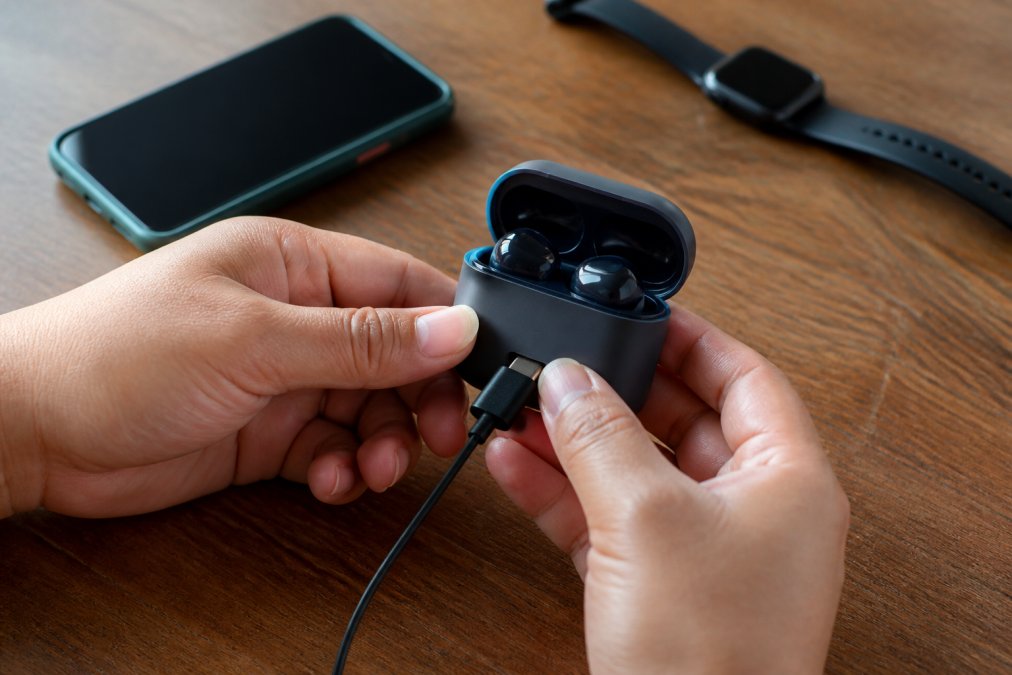
Charging habits decide how many good years you get. The goal is to avoid overcharging, avoid deep discharge, and understand that your charging case and your earbuds are two separate batteries with two separate lifespans.
Avoiding Overcharging and Deep Discharge
Overcharging is less of a problem than it used to be, since most modern headphones stop the charge at full. The real issue is heat during charging and leaving them plugged in at 100% for days. Unplug once they’re full, or use a case that manages the cutoff.
Deep discharge is the other extreme. Draining to 0% and leaving them dead for weeks can push a cell below its safe voltage and permanently reduce capacity. If you’re storing headphones, charge them to about half first.
Case Battery vs. Earbud Battery
Your charging case and your earbuds hold separate batteries, and they age at different rates. The case typically has the larger cell and lasts longer, while the tiny earbud cells cycle far more often and degrade first.
This is why “my case still shows full but my earbuds die fast” is such a common complaint. It’s not a case problem. It’s the earbud cells reaching the end of their useful cycles. Test the two independently before assuming the whole product has failed.
| Habit | What It Protects | Practical Rule |
|---|---|---|
| Partial charges | Earbud cells | Keep between 20% and 80% |
| Unplug when full | Both batteries | Avoid days at 100% |
| Cool storage | Both batteries | Around half charge, room temperature |
| Firmware updates | Power management | Check the app monthly |
Troubleshooting Sudden Battery Drops
Sudden drops are usually a calibration or firmware issue, not a dead battery. If your headphones go from 40% to shutdown in minutes, the reported percentage has drifted from the actual charge level. The goal of this section is to help you tell the difference between a battery that is genuinely failing and one that is just draining fast, because the two have very different fixes.
Step 1: Separate a Reporting Problem from a Capacity Problem
A failing cell and a miscalibrated fuel gauge look similar at first. They are not the same thing.
- Reporting problem: the percentage is wrong, but the total runtime is roughly normal. The headphones may sit at 40% for an hour and then jump to 0%, or shut down at 15% and restart at 20%.
- Capacity problem: the total runtime is genuinely shorter. The headphones charge to 100% and then die in half the time they used to, regardless of what the percentage says.
If the total runtime is unchanged and only the number is erratic, you are dealing with calibration. If the runtime itself has shrunk, you are dealing with capacity loss, and the steps below will confirm it.
Step 2: Recalibrate the Fuel Gauge
Start with a battery calibration: drain the headphones fully until they power off on their own, then charge them uninterrupted to 100% and leave them on the charger for another hour after the indicator reads full. This lets the fuel gauge relearn the cell’s true empty and full points. Repeat once if the first attempt does not hold. Calibration fixes reporting drift, not capacity loss, so if runtime is still short afterward, move on.
Step 3: Rule Out Firmware and Pairing
If calibration does not fix it, check for a firmware update. Manufacturers ship power-management fixes through firmware, and a stale version can leave efficiency on the table. Then test with a single paired device. Multiple active pairings can keep the radio busy and drain the battery even when nothing is playing. Forget the extra devices and re-pair just one to clear a bad pairing record.
Step 4: Isolate the Earbud Cells from the Case
Test the earbuds and the case separately to isolate which cell is failing. Charge both fully, then use only the earbuds and time how long they last. Then check how many recharges the case still provides. If the earbuds die quickly but the case still holds several charges, the earbud cells are the ones that have aged out, which is normal because the tiny earbud cells cycle far more often than the larger case cell.
Step 5: Decide Whether to Replace
Only replace the product once you have ruled out the cheap fixes. A useful rule of thumb: if a full calibration and a firmware update do not restore runtime, and the earbuds die in well under half their original rated playback time, the cells have reached the end of their useful cycles. At that point, replacement is the honest answer, and no setting will bring the capacity back.
Keep a rough note of your typical runtime when the headphones are new. Having a baseline makes it obvious later whether a drop is a reporting glitch or real capacity loss.
Conclusion
Battery fade feels inevitable, but most of it traces back to habits you control: heat, full-charge storage, and features left running when you don’t need them. Fix those and you’ll get more useful years out of the headphones you already own.
When it is genuinely time to replace them, finding a pair worth the money without wading through dozens of listings can be a challenge. Greenmatrax.com is a curated tech discovery platform designed to simplify your shopping experience by aggregating the best gadgets and smart devices in one place. We meticulously review and select high-quality electronics to ensure you receive genuine value and reliable performance without the hassle of searching multiple websites. Whether you are looking for the latest tech trends or daily deals, our platform provides a smart, trustworthy, and efficient way to find products that perfectly match your needs. Get started with Greenmatrax.com and find your next pair without the guesswork.
Frequently Asked Questions
Does high volume drain headphone battery faster?
Yes. Higher volume increases power consumption because the drivers work harder to produce sound. Reducing volume from maximum to about 60-70% can extend playback time noticeably. The effect is more pronounced with bass-heavy tracks, which demand more energy. If you use audio enhancements like bass boost, lowering volume becomes even more important for battery health.
How often should I charge my wireless headphones?
Charge them when the battery drops to around 20-30%, and unplug once they reach 80-90%. Lithium-ion batteries degrade faster when kept at full charge or drained completely. Partial charges throughout the day are better than one deep cycle. If you use them daily, a top-up every one or two days works well. Avoid leaving them plugged in overnight regularly.
Do noise-canceling features affect battery life?
Active noise cancellation (ANC) draws extra power because it runs dedicated microphones and processing. Enabling ANC can reduce playback time by several hours depending on the model. Transparency mode uses similar processing. Turning off ANC when you are in quiet environments is one of the simplest ways to extend battery life without changing your listening habits.
How can I tell if my headphone battery is degrading?
Shorter playback time on a full charge is the clearest sign. You might also notice the battery percentage dropping faster than usual or inconsistent estimates. Most lithium-ion batteries lose about 20% capacity after 300-500 charge cycles. If your headphones once lasted 30 hours and now struggle to reach 15, degradation is likely. Firmware updates and battery calibration can sometimes help.